Newsletter Studio
The technical craft story
What Email rendering is one of the most frustrating problems in front-end engineering. Outlook on Windows uses Word's rendering engine. Outlook on Mac uses WebKit. Gmail strips <style> tags entirely. Every client interprets the same HTML differently.
Why Amazon's internal teams were producing newsletters through Word docs and copy-paste, with no way to preview rendering, no version history, and no shared workspace.
How I built a platform that solved both: a schema-driven MJML engine for guaranteed cross-client rendering, and a collaborative authoring environment with live preview, versioning, and AI content generation.
Overview
A full-stack email newsletter platform that evolved across three deliberate phases: foundation (collaborative authoring, MJML templates, live preview), AI as assistant within those flows, then AI as primary driver while keeping users in control. I owned the entire vertical — infrastructure-as-code, backend API, frontend components, MJML extensions, AI integration, and interaction design — a solo build where every layer informed the others.
Pain Points
Even within a single brand, rendering is fractured. Outlook on Windows uses Word's engine, Outlook on Mac uses WebKit, and Outlook on the web strips and re-processes CSS differently from both. A newsletter that looks correct in one Outlook variant breaks in another. No amount of manual testing could keep up with the fragmentation.
Newsletter production lived in Word docs, email threads, and copy-paste workflows. There was no shared workspace, no live preview, no version history. Multiple people editing the same newsletter meant conflicting versions and lost changes.
Milestone 1: MJML to the Rescue
The first phase focused entirely on the collaboration and authoring hypothesis, with no AI involved. Could a shared workspace with predefined templates, real-time preview, and cross-client rendering make newsletter production meaningfully faster? The engine and the editor were built as two independent layers to validate this before layering anything on top.
The rendering engine
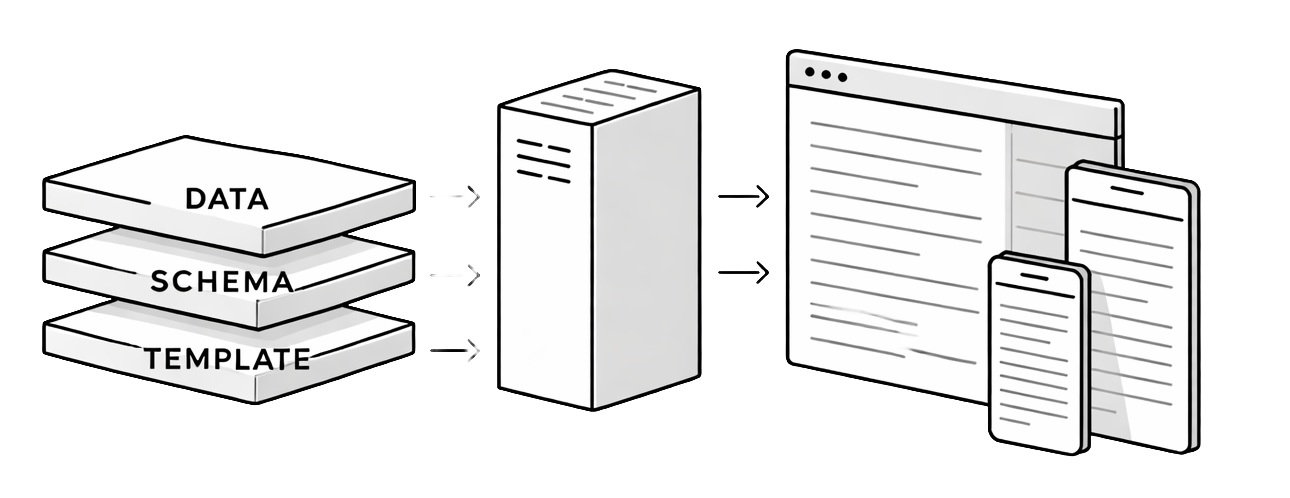
Publishing a new template requires three ingredients: a Handlebars template (MJML markup with expression placeholders), a JSON schema (declaring the fields: headline, body sections, image slots), and JSON data (the actual content for a given edition). The rendering engine combines all three to produce cross-client HTML.
Handlebars Template
+ JSON Schema
+ JSON Data
  = HTML Email
User flow
Users subscribe to a template, then edit data through the editor. The schema validates input, Handlebars binds it into MJML markup, and MJML compiles to HTML that renders consistently across Outlook, Gmail, Apple Mail, and mobile. Authors work with structured data only, never raw HTML.
  User
    → Edit Data
    → Validate against Schema
    → Compile MJML
      → HTML Email
The editor
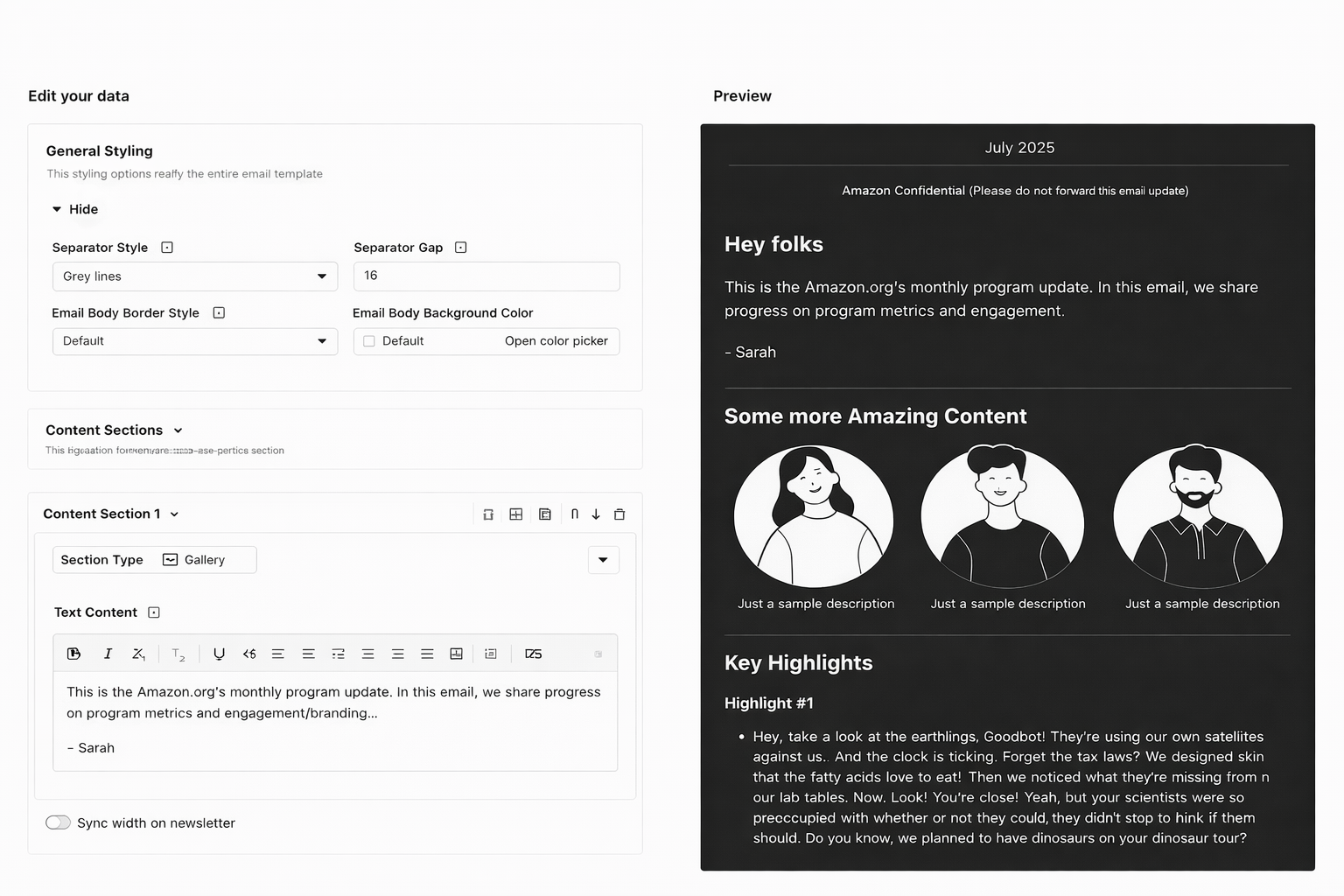
- Dual-mode editorUsers switch between a raw JSON editor and a form-based interface, both backed by react-jsonschema-form (rjsf), which renders the form directly from the JSON schema. Edits in either mode share identical state: changes in the form update the JSON; changes in JSON update the form.
- Live previewMJML compilation completes in milliseconds for typical templates, and iframe isolation prevents styling conflicts between editor and email CSS. The preview updates as users edit in either mode, turning the editor from a batch tool into a real-time creative environment.
Milestone 2: AI Flow for Creation
With the foundation validated, the second milestone introduced AI into the existing authoring flows. The goal was assistance, not replacement: AI handled structural and repetitive work while users retained editorial control. What followed was two distinct versions, each shaped by what the previous one revealed.
V1: single-shot generation
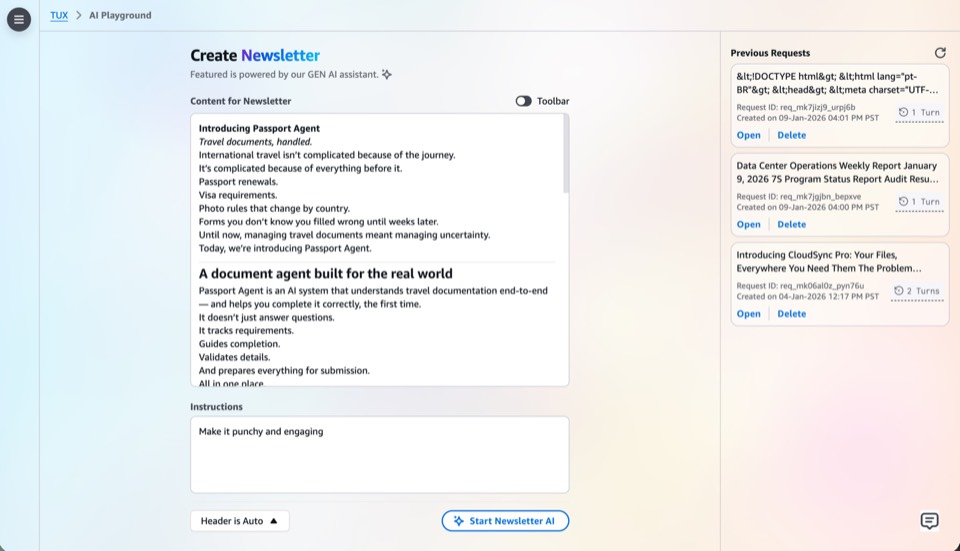
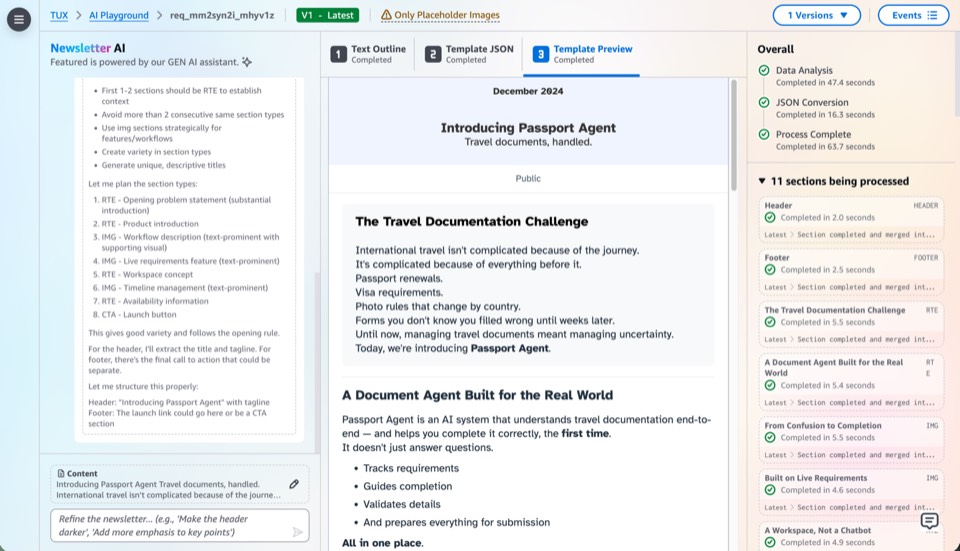
A deliberately minimal prototype: the user provides a text prompt, the AI generates the entire JSON data payload in one pass, and the rendering engine compiles it to HTML. No persistence, no versioning, no conversation. Built to test one thing: whether AI-generated newsletter content was useful at all.
  Prompt
  → AI generates JSON data
    → Rendering engine
      → HTML Email
It worked, but feedback scores dropped. Users didn't trust single-shot output they couldn't steer. The AI would misinterpret tone, over-generate content, or miss key details from the source material. Without a way to course-correct, users spent more time fixing AI output than they would have spent writing from scratch.
  V1: Single-shot generation
      ↓
  ✗ Feedback scores plummeted
  ✗ Users couldn't steer output
  ✗ Fixing AI output > writing from scratch
      ↓
  V2: Multi-turn chat for creation
V2: multi-turn chat for creation
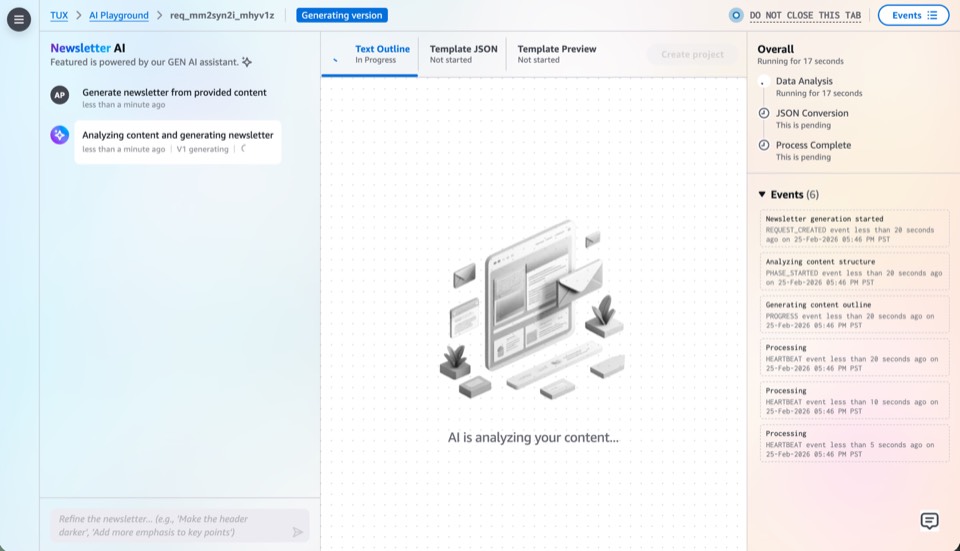
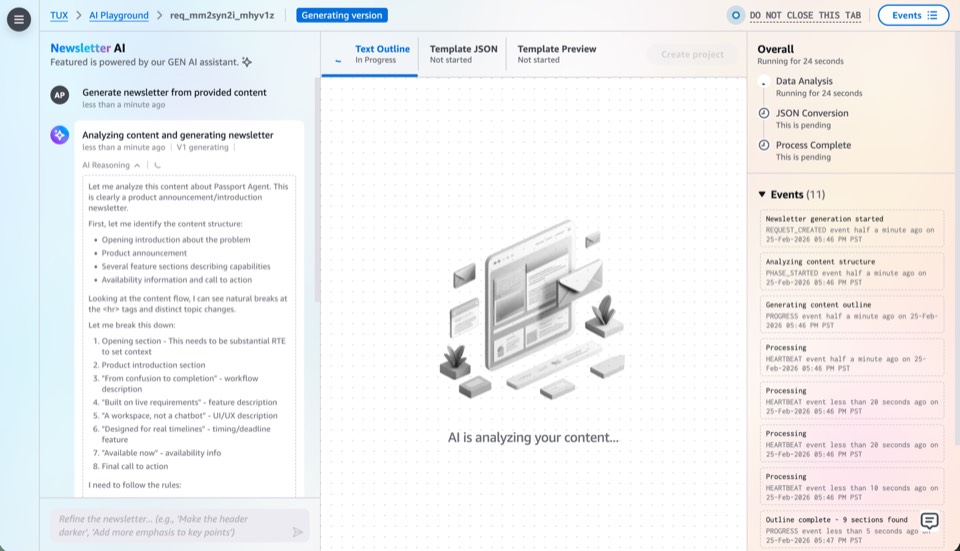
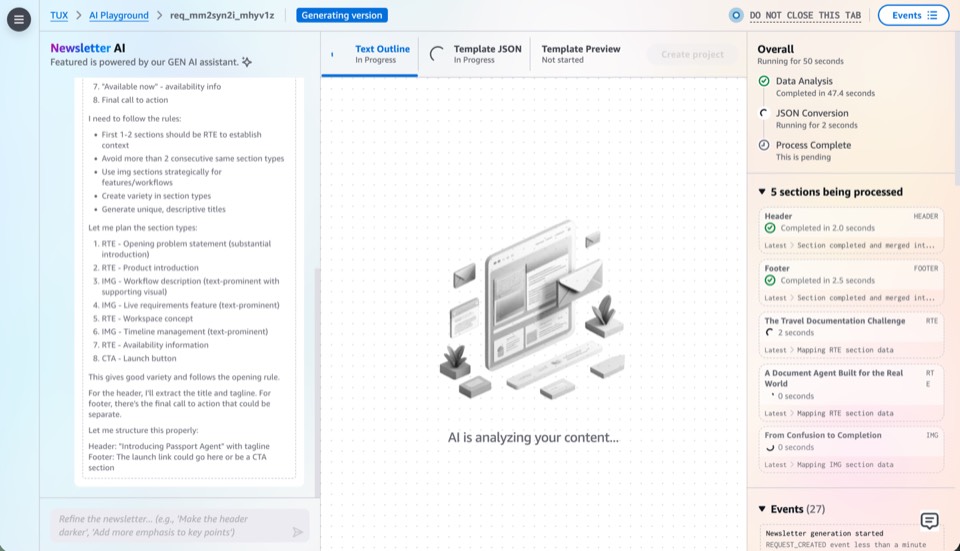
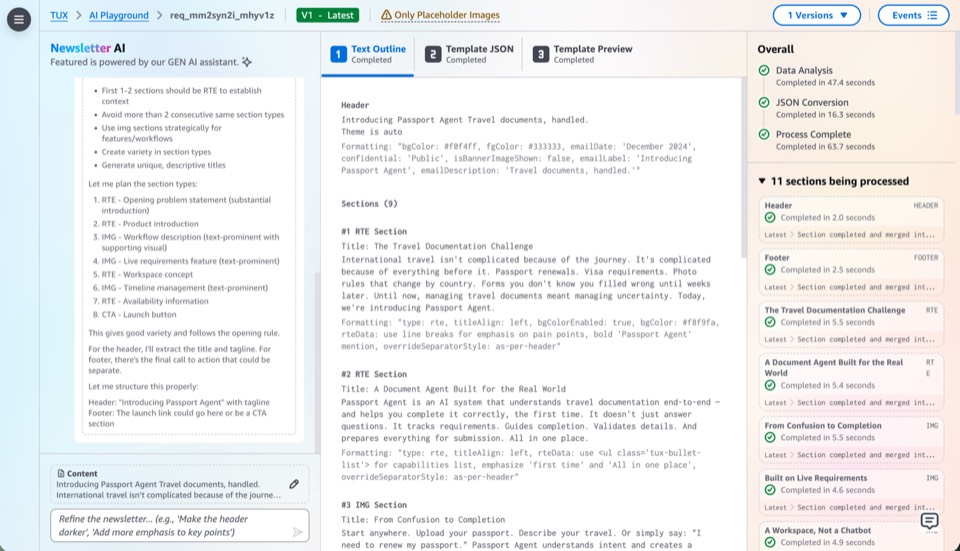
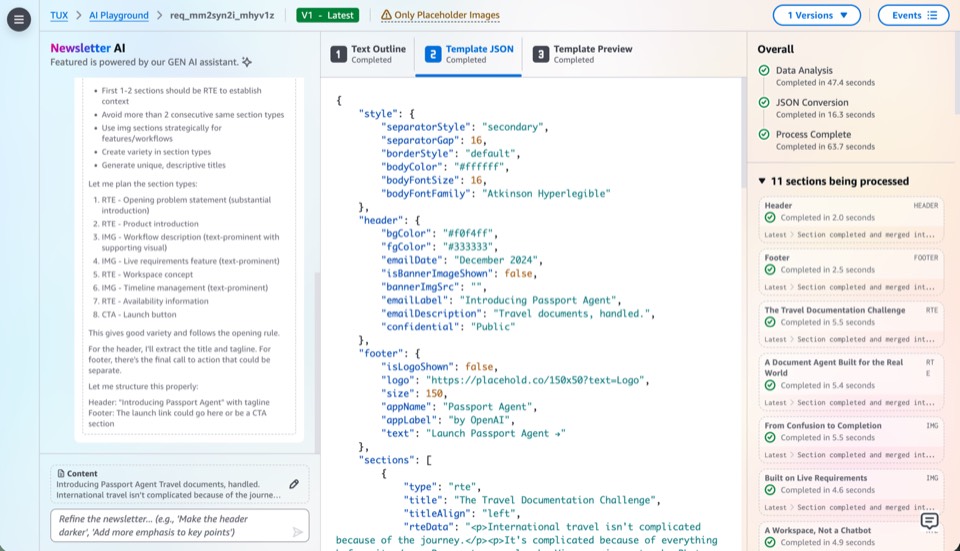
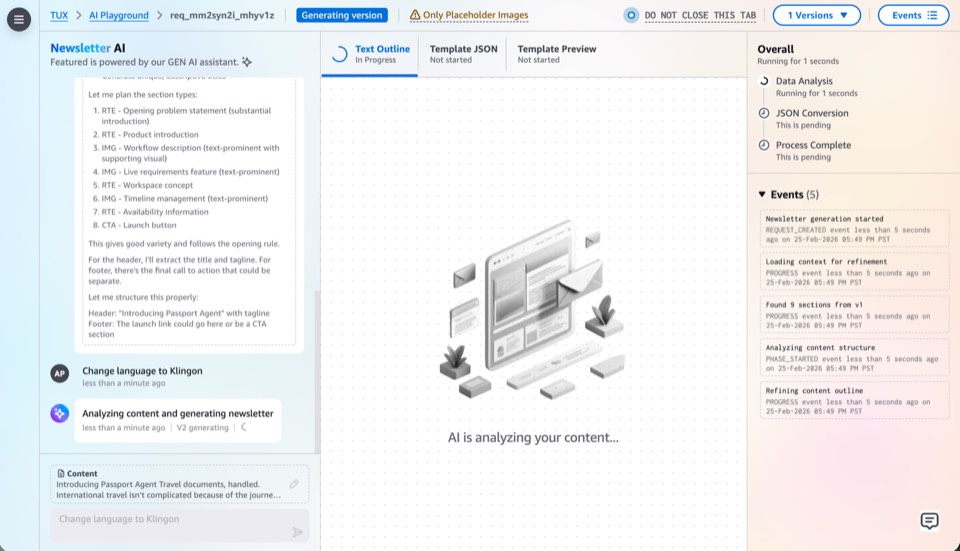
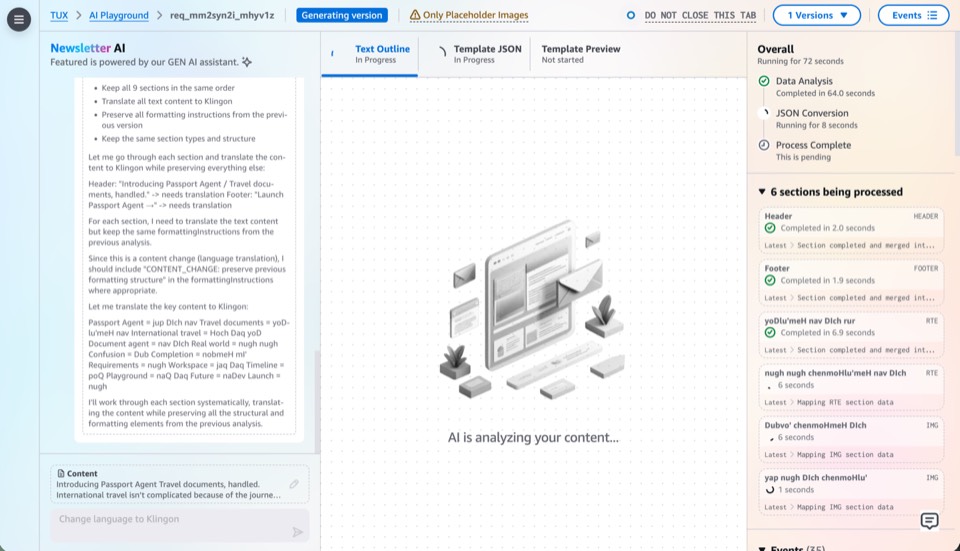
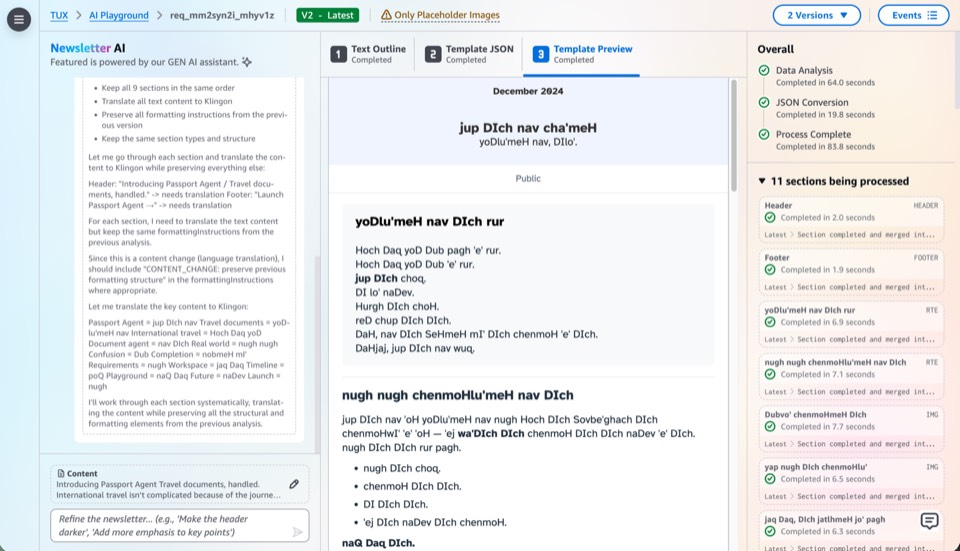
V2 replaced the single-shot model with a conversational interface. Users describe what they want, the AI generates a first pass, and then a chat panel allows targeted refinements: "make the introduction shorter," "emphasize the deadline more," "use a more formal tone." Every exchange builds on the previous context.
- Session persistenceEvery generation creates a versioned snapshot. Users return to previous sessions days later, compare versions side by side, roll back without losing anything. Experimentation is safe because nothing is destroyed.
- Editorial controlThe conversational model preserved what V1 broke: the user's editorial voice. Instead of accepting or rejecting a monolithic output, users shape the result incrementally through natural-language direction.
Milestone 3: AI as Primary Driver
This milestone moves AI from assistant to primary driver, expanding from chat-based creation into every surface of the platform. Users direct through conversation; AI executes across editing, previewing, template authoring, and data mutation.
- Chat-based editsUsers refine existing newsletter content through conversation: "shorten the intro," "swap the hero image," "reorder these sections." AI applies edits directly to the JSON data, with changes reflected in the live preview instantly.
- Chat-based previewAI generates preview variants on demand: "show me this in a two-column layout," "preview with a darker color scheme." Users compare options conversationally rather than manually tweaking fields and waiting for recompilation.
- Chat-based template creationAI authors new MJML templates from natural-language descriptions: "create a weekly digest template with a hero section, three article cards, and a footer." Generates the Handlebars template, JSON schema, and sample data as a complete package.
- Mutative tool useAI gains access to write-level operations: creating editions, updating template schemas, publishing drafts. The shift from read-only assistance to mutative actions, with user approval gates at each step to keep humans in control.
Adoption
The platform reached 200+ users through word of mouth in the first month, with no formal launch and no training sessions. People heard about it from colleagues and started using it.
Reflections
- Cost is a design materialAs AI moves from occasional assistant to primary driver, token cost becomes a first-class design constraint, as real as screen space or latency. Ignoring it produces features that work in demos but not at sustained organizational scale.
- AI adoption is a gradient, not a switchUsers don't go from manual to AI-driven overnight. Phase 2 proved that AI works best when it enters existing workflows as an accelerator. Phase 3 can only succeed because users built trust with AI during Phase 2.
Technology
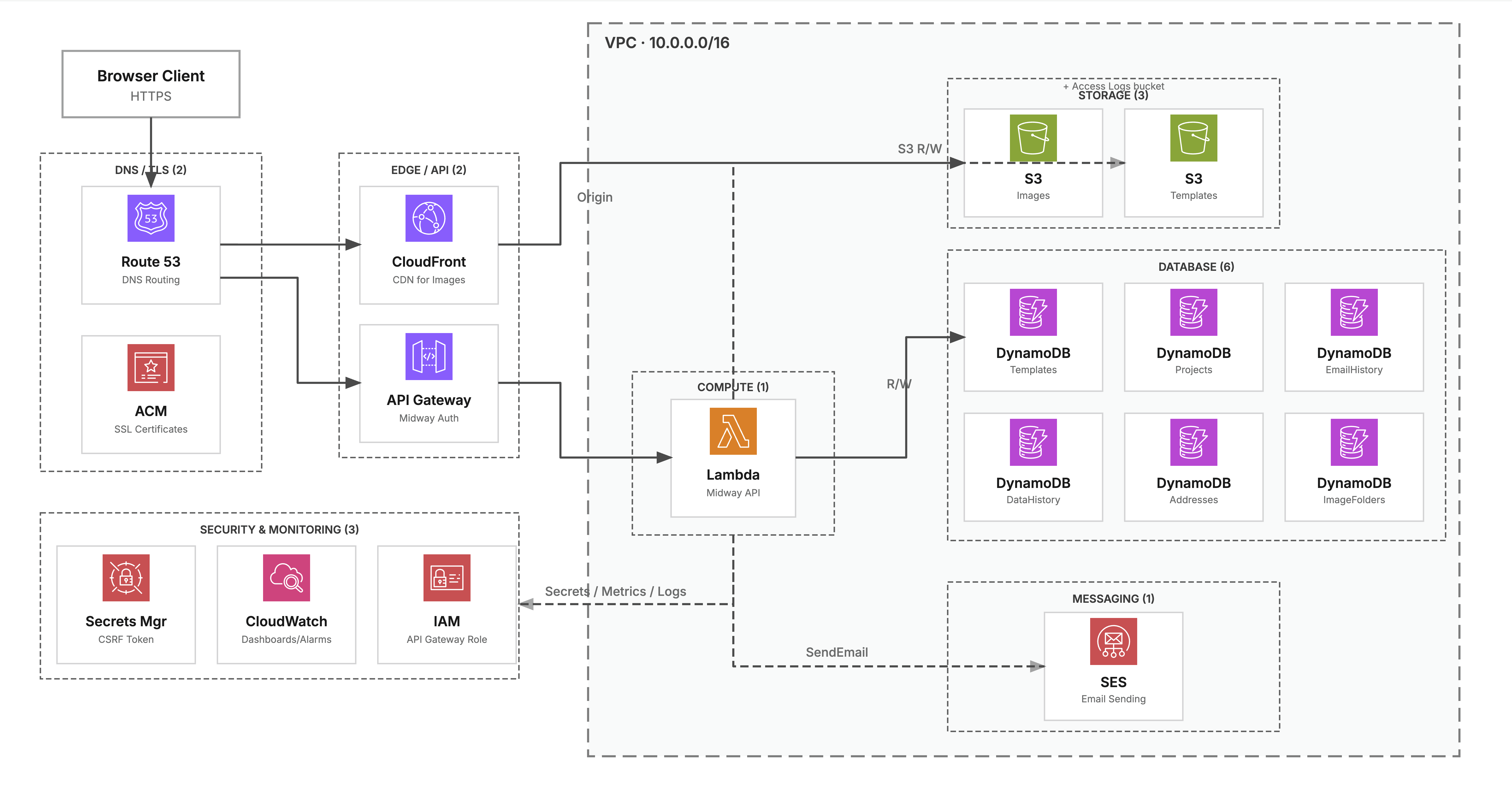
The entire backend is deployed as infrastructure-as-code using AWS CDK. The stack includes API Gateway, Lambda functions, DynamoDB tables, S3 buckets, and SES for email delivery, all defined in TypeScript and deployed through a single pipeline.
Appendix
What are the backend API modules?
Ten Lambda-backed modules, each owning a single domain. Every handler follows the same pattern: authenticate, validate CSRF for mutations, execute business logic, return a standardized response.
| Module | File | Purpose |
|---|---|---|
| Templates | _templates.api.ts | Template CRUD, versioning, MJML source management |
| Projects | _projects.api.ts | Newsletter project lifecycle management |
| MJML | _mjml.api.ts | MJML-to-HTML compilation with custom components |
| Images | _images.api.ts | Image upload, organization, CDN URL generation |
| _email.api.ts | SES integration for email distribution | |
| History | _history.api.ts | Version tracking and audit trail |
| Addresses | _addresses.api.ts | Recipient list management |
| Auth | _auth.api.ts | Authentication and session management |
| Admin Email History | _admin-email-history.api.ts | Admin-level email audit trail |
| AAS | _bindle.api.ts | Amazon authentication system integration |
How are the DynamoDB tables designed?
Eight tables, each chosen for a specific access pattern. The schema decisions reflect production tradeoffs: not just "use DynamoDB" but why each table is configured the way it is.
| Table | Purpose |
|---|---|
| commonConfigTable | Key-value configuration storage |
| templatesTable | Newsletter template definitions |
| projectsTable | Active newsletter projects (GSI: template) |
| dataHistoryTable | Version history (GSI: timestamp) |
| emailHistoryTable | Send audit trail (GSI: timestamp, event) |
| addressTable | Recipient address books |
| imageFoldersTable | Image organization (GSI: folderName) |
| feedbackTable | User feedback collection |
On-demand vs. provisioned: Tables with unpredictable access patterns (projects, feedback) use on-demand billing, while tables with consistent patterns (history) use provisioned capacity with auto-scaling at 50% target utilization. Draft projects use TTL attributes for automatic expiration of abandoned data, requiring no cron job or manual cleanup.
Point-in-time recovery: Enabled on all tables for disaster recovery.
Global Secondary Indexes: The templateIndex on projects enables efficient queries for all projects using a specific template. History tables have timestamp GSIs for time-range queries.
Why does the platform need CSRF protection?
The platform is an internal tool that runs behind corporate authentication, but authentication alone doesn't prevent cross-site request forgery. Any page a user visits while authenticated could silently issue mutations (create projects, send emails, delete templates) by forging requests to the API. Since the platform handles email distribution to real recipients, an unprotected mutation surface is a direct organizational risk. To address this, the implementation uses HMAC-based tokens with timestamp expiration and timing-safe comparison, with the CSRF secret rotating via AWS Secrets Manager and every mutation (POST, PUT, DELETE) validated before business logic executes.
import crypto from 'crypto';

export function generateCsrfToken(
  secret: string,
  sessionId: string,
  timestamp: number
): string {
  const payload = `${sessionId}:${timestamp}`;
  const signature = crypto
    .createHmac('sha256', secret)
    .update(payload)
    .digest('hex');
  return `${payload}:${signature}`;
}

export function validateCsrfToken(
  token: string,
  secret: string,
  maxAgeSeconds: number
): boolean {
  const parts = token.split(':');
  if (parts.length !== 3) return false;

  const [sessionId, timestampStr, signature] = parts;
  const timestamp = parseInt(timestampStr, 10);

  // Check expiration
  const now = Math.floor(Date.now() / 1000);
  if (now - timestamp > maxAgeSeconds) return false;

  // Verify signature — timing-safe to prevent oracle attacks
  const expectedToken = generateCsrfToken(secret, sessionId, timestamp);
  return crypto.timingSafeEqual(
    Buffer.from(token),
    Buffer.from(expectedToken)
  );
}
How is HTML content sanitized against XSS?
The platform deals in HTML at every layer: MJML compiles to HTML, users paste rich text into editors, AI generates HTML-adjacent JSON data, and the live preview renders it all in an iframe. Every surface where user-supplied or AI-generated content touches the DOM is a potential XSS vector, so sanitization happens at multiple boundaries. On the frontend, DOMPurify strips script tags, event handlers, and dangerous attributes from any HTML before it enters the preview iframe, which is itself sandboxed to isolate the rendered email from the parent application's DOM and cookies. On the backend, the MJML compilation pipeline validates markup structure and rejects malformed input before it reaches storage, while JSON data bound into Handlebars templates uses escaped expression syntax by default to prevent injection through template variables. The combination ensures that no unsanitized content reaches the browser, the email output, or the storage layer.
How are images handled?
Image handling is designed around two constraints: keeping upload payloads small (Lambda has a 6 MB request body limit) and never exposing S3 bucket credentials to the browser. To satisfy both, the client compresses images in-memory using the Canvas API, resizing dimensions and reducing quality to produce a smaller JPEG or PNG without requiring a round-trip to the server. The compressed blob is then uploaded directly to S3 using a presigned PUT URL generated by the backend, so the browser sends the file straight to S3 and the Lambda function never touches the image bytes, only the metadata.
For serving images in newsletters, the backend generates presigned GET URLs that are embedded into the compiled HTML. These URLs are time-limited and scoped to specific objects, so no broad bucket access is ever granted. In production, CloudFront sits in front of S3 with an Origin Access Identity, so even the presigned URLs are served through the CDN for caching and global edge delivery.
Why a single Lambda behind API Gateway instead of separate functions per route?
The backend uses a single Lambda function that receives all API Gateway events and routes internally via httpMethod and pathParameters. This keeps deployment simple (one artifact to build, test, and deploy) and avoids the cold-start multiplication problem where dozens of separate functions each have independent cold-start pools. The trade-off is a larger deployment package and a shared memory ceiling, but for an internal tool with moderate traffic, the operational simplicity outweighs the theoretical scaling benefits of per-route functions.
Future path: If traffic patterns later demanded it, splitting into per-domain Lambdas (one for templates, one for images, etc.) would be straightforward because each API module (_templates.api.ts, _images.api.ts, etc.) is already isolated by file.
Why React Context instead of Redux, Zustand, or MobX?
The AI Playground's state (phase tracking, streaming chunks, version history, session management) is complex but scoped entirely to a single feature boundary. React Context with useMemo on the provider value and a typed usePlayground() hook gives structured state management without the boilerplate of Redux or the additional dependency of Zustand. The context provider wraps only the AI Playground's component subtree, so state changes never propagate to unrelated parts of the application.
When to upgrade: If the platform grew to need cross-feature shared state (e.g., a global notification system that reacts to AI events), Redux or Zustand would become the right tool. Introducing global state management prematurely would have added complexity without benefit.
How does the dual-mode editor stay in sync?
Both the form-based editor and the raw MJML code editor are projections of a single shared data model, not two separate editing systems with synchronization logic. When a user changes a field in the form, the underlying MJML data structure updates, and the code editor reflects the new source. When a user edits raw MJML, the form fields re-derive their values from the updated structure. This "single source of truth" approach avoids the common pitfall of building two editors and then trying to keep them consistent. Conflicts are architecturally impossible because there's only one canonical state.
Prototype path: Early prototyping explored fully dynamic form generation from templates, but testing showed that unpredictable layouts confused users, so the shipped version uses standardized form patterns with template-specific customization.
What is MJML and why was it chosen?
MJML is an open-source markup language that compiles to email-safe HTML. Email rendering is notoriously fragmented: Outlook uses Word's rendering engine, Gmail strips <style> tags, and mobile clients have their own quirks. Building cross-client HTML from scratch would consume months of debugging. MJML abstracts this complexity: you write semantic components (mj-section, mj-column, mj-text) and the compiler produces the nested tables, inline styles, and conditional comments needed for consistent rendering. Crucially, MJML is also extensible, supporting custom components that inherit from its BodyComponent class, which made it possible to build the carousel and other custom elements without forking the framework.
What are the three carousel fallback layers?
The carousel implements three degradation layers to handle the email client landscape gracefully. Layer 1: Full interactivity. Clients that support CSS :checked selectors and form elements (Apple Mail, iOS Mail, modern Outlook) get thumbnail navigation and animated slide transitions. Layer 2: MSO conditional rendering. Older Outlook versions using Word's engine receive the first image rendered in a static <table> layout via <!--[if mso]> conditional tags, bypassing the interactive CSS entirely. Layer 3: noinput fallback. Clients that strip <input> and <label> elements see only the first image with all navigation hidden, preserving a clean layout with no broken UI artifacts.
Design principle: The email design is complete at every fallback level, not just at the top tier. Progressive enhancement means no user ever sees a broken layout, only a less interactive one.
Can multiple carousels exist in one email?
Yes. Each carousel instance generates a unique hexadecimal ID (genRandomHexString(16)) in its constructor. This ID namespaces the radio button name attribute, the CSS selectors, and the label for attributes. Without this, two carousels in the same email would share a single radio button group, and clicking a thumbnail in one carousel would affect the other. The random ID generation ensures complete isolation between instances.
How does streaming work technically?
The key technical challenge was getting AI responses to stream end-to-end (from the model, through the backend, to the browser) without buffering the entire response first. API Gateway response streaming, a relatively recent AWS capability, made this possible: the Lambda function writes chunks to a response stream as they arrive from the AI service, and API Gateway forwards each chunk to the client immediately rather than waiting for the full payload. On the infrastructure side, this required configuring the Lambda function URL with RESPONSE_STREAM invoke mode and setting the appropriate content type for chunked transfer encoding. On the frontend, the browser consumes the stream via the Fetch API's ReadableStream interface, appending each chunk to the UI as it arrives. The result is that users see AI-generated content appearing token by token, matching the experience of conversational AI tools, but delivered through a serverless backend with no persistent connections or WebSocket infrastructure.
Which prototypes didn't ship and why?
Four significant prototypes explored ideas that ultimately didn't become features. Template Builder tested whether AI could extract reusable template structures from sample emails: paste an existing newsletter and get a reusable MJML template back. In practice, email HTML is heavily nested tables with inline styles, making structural extraction unreliable, and users expected pixel-perfect reproduction that AI couldn't guarantee. Banner Playground explored rich visual editing beyond newsletter sections but revealed that full design-tool capabilities would dilute the platform's focus and require disproportionate engineering investment. Real-Time Collaboration investigated simultaneous multi-user editing via operational transforms, but the use case was narrow (most newsletters have single authors) and simpler version control met the actual need. Animation Explorations evaluated which UI interactions benefited from motion. Most didn't, and only subtle patterns like pop-in animations and aurora loading effects shipped.